

DevOps on IBM i
Using Git and TOBi on IBM i: A Practical Deployment Flow
A practical way to think about Git, TOBi, branch strategy, environment builds, deployment automation, rollback planning, and IBM i-friendly DevOps.

Git on IBM i is not just about moving source code into a repository. The real value starts when Git becomes part of a controlled development, promotion, build, deployment, and rollback process.
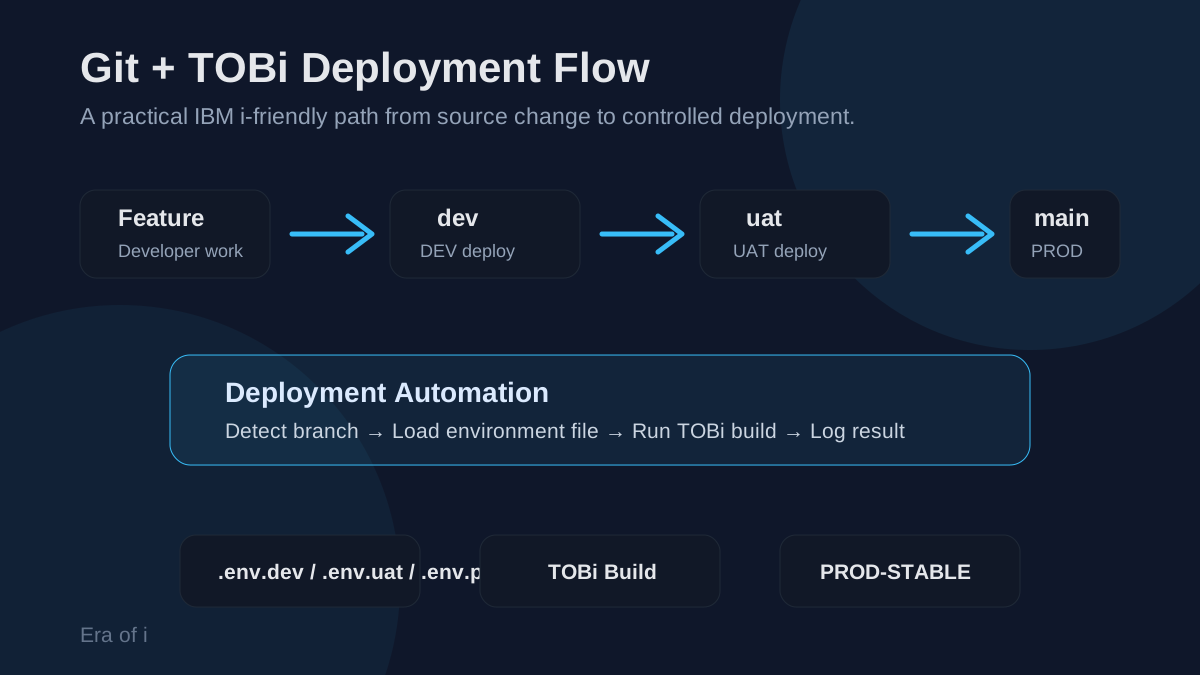
A practical IBM i deployment flow should connect Git branches, environment configuration, TOBi builds, and production rollback planning.
For IBM i teams, DevOps cannot be treated as a simple copy of what works on other platforms.
IBM i has its own realities: libraries, objects, source members, compile order, job descriptions, library lists, service programs, binding directories, database objects, commands, display files, printer files, authorities, and environment-specific runtime behavior.
That does not make DevOps harder for the sake of being harder.
It means IBM i DevOps needs to be designed with the platform in mind.
Git is valuable on IBM i, but Git by itself is not the solution.
The solution is a controlled flow from development to test to production.
Key idea
A good IBM i DevOps flow should not try to make IBM i look like every other platform. It should make IBM i delivery safer, more traceable, more repeatable, and easier to understand.
Who this article is for
This article is for IBM i developers, technical leads, architects, and teams who are asking questions like:
- How should we use Git with RPG, SQLRPGLE, CL, DDS, and SQL source?
- How do we move changes safely from development to UAT to production?
- How can TOBi or makei fit into a repeatable IBM i build process?
- How do we avoid compiling into the wrong library or using the wrong library list?
- How do we protect production from accidental changes?
- How should we think about rollback on IBM i?
If your team is still moving source manually, compiling directly in target libraries, relying on memory for promotion steps, or struggling to understand what changed between environments, this article is for you.
What this flow is trying to solve
Many IBM i teams do not have a source control problem only.
They have a delivery control problem.
The risks usually show up in places like:
- Source changes that are hard to trace
- Manual promotion steps
- Unclear development, UAT, and production boundaries
- Compiles into the wrong library
- Missing dependent object builds
- Production updates without enough review
- No clear rollback point
- Build failures that are difficult to diagnose
- Environment-specific configuration stored in people’s memory
Git helps with some of this.
TOBi helps with some of this.
Deployment automation helps with some of this.
But the real improvement comes when these pieces are connected into one flow.
Why Git on IBM i needs structure
Many teams start with Git by asking a simple question:
How do we store RPG source in Git?
That is a good first step, but it is not enough.
The bigger question is:
How do we safely move IBM i changes from development to test to production?
That question is more important because the real risk is usually not source storage. The real risk is uncontrolled promotion, manual deployment, missing compile steps, wrong library lists, inconsistent environments, unclear rollback plans, and production changes that are hard to trace.
A practical Git strategy for IBM i should help answer:
- Who changed the source?
- What changed?
- Why did it change?
- Which environment received the change?
- Was the build successful?
- Which objects were compiled?
- Which branch represents production?
- What was the last stable production version?
- How do we recover if a production build fails?
That is where Git becomes more than a source repository.
It becomes part of an engineering process.
A simple branch model
A practical IBM i Git strategy should start simple.
For many teams, this branch model is enough:
dev   → development environment
uat   → user acceptance / test environment
main  → production-ready code
The promotion path becomes:
feature branch
      ↓
dev
      ↓
uat
      ↓
main
Each branch should represent a different level of confidence.
The dev branch is where active work is integrated and tested by developers.
The uat branch is where changes are promoted for user acceptance testing, QA validation, or business review.
The main branch should represent production-ready code.
Keep the branch model simple at first.
A clear promotion flow that the team actually follows is better than a complicated branching strategy that looks good on paper but fails in daily use.
Feature branches still matter
Even with a simple dev, uat, and main model, developers should usually work in feature branches.
For example:
feature/customer-api-validation
feature/invoice-date-fix
feature/journal-monitoring-alerts
bugfix/null-merge-handling
A developer works in a feature branch, tests the change, and then merges into dev.
That gives the team a cleaner separation between:
- Work in progress
- Integrated development code
- UAT-ready code
- Production-ready code
The flow becomes:
feature branch
      ↓
merge to dev
      ↓
deploy to development
      ↓
promote to uat
      ↓
deploy to UAT
      ↓
promote to main
      ↓
deploy to production
This is simple enough to understand, but structured enough to reduce confusion.
Why direct production changes should be avoided
On IBM i, it can be tempting to fix something quickly by compiling directly into a production library.
Many teams have done this because the platform makes it easy.
But easy does not always mean safe.
Direct production changes create problems:
- The source in Git may not match the object in production.
- The change may not exist in development or UAT.
- The team may not know who changed what.
- Rollback becomes harder.
- Future deployments may overwrite emergency changes.
- Auditability becomes weak.
A Git-based flow should reduce these situations.
Production should be updated through a known path:
dev → uat → main → productionEmergency fixes can still exist, but they should also be brought back into the Git flow as quickly as possible.
Mapping branches to environments
A useful IBM i deployment flow should know which environment to deploy to based on the branch.
For example:
dev   → DEV libraries
uat   → UAT libraries
main  → PROD libraries
The deployment process can detect the branch and load the correct configuration.
Conceptually:
Git branch changed
      ↓
Determine target environment
      ↓
Load environment configuration
      ↓
Run build
      ↓
Deploy objects
This keeps the process consistent.
Developers do not need to manually remember which library to compile into. The branch and environment configuration should drive that decision.
Environment-specific configuration
On IBM i, environment configuration matters.
A program compiled in the wrong library, with the wrong library list, or against the wrong database library can create serious problems.
A practical setup may use environment files like:
.env.dev
.env.uat
.env.prod
Each file can define values such as:
OBJLIB=MYAPPDEV
DBLIB=MYDBDEV
CURLIB=MYAPPDEV
LIBLIST=MYAPPDEV,MYDBDEV,COMMONLIB
The deployment script can map branches to files:
dev   → .env.dev
uat   → .env.uat
main  → .env.prod
The exact format is less important than the principle:
Environment-specific values should be controlled, repeatable, and visible.
They should not live only in someone’s memory.
Example environment setup
A development environment file may look like this:
OBJLIB=MYAPPDEV
DBLIB=MYDBDEV
CURLIB=MYAPPDEV
LIBLIST=MYAPPDEV,MYDBDEV,MYCOMMON
A UAT file may look like this:
OBJLIB=MYAPPUAT
DBLIB=MYDBUAT
CURLIB=MYAPPUAT
LIBLIST=MYAPPUAT,MYDBUAT,MYCOMMON
A production file may look like this:
OBJLIB=MYAPPPROD
DBLIB=MYDBPROD
CURLIB=MYAPPPROD
LIBLIST=MYAPPPROD,MYDBPROD,MYCOMMON
This makes the environment differences explicit.
When a build runs, the deployment process knows which values to use based on the branch being deployed.
Be careful with library lists
Library lists are powerful, but they can also create confusion.
The same program may compile successfully in one environment and fail in another because the library list is different.
The same program may run differently because it finds a different file, service program, data area, job description, or command earlier in the library list.
That is why the deployment flow should make the library list intentional.
A good process should answer:
- What libraries are used during compile?
- What libraries are used at runtime?
- Are DEV, UAT, and PROD library lists aligned?
- Are common libraries shared safely?
- Are test objects accidentally visible in production jobs?
- Are production objects accidentally visible in development builds?
IBM i DevOps should not ignore library lists.
It should make them visible and controlled.
Suggested repository structure
Every team will organize source differently, but a simple starting structure may look like this:
my-ibmi-app/
  .env.dev
  .env.uat
  .env.prod

  iproj.json
  Rules.mk

  src/
    qrpglesrc/
      CUSTAPI.rpgle
      INVPROC.sqlrpgle

    qclsrc/
      BUILDALL.clle
      STRAPP.clle

    qddssrc/
      CUSTDSP.dspf

    qsqlsrc/
      tables/
        CUSTOMER.sql
        INVOICE.sql

      views/
        CUSTOMER_ACTIVE.sql

      migrations/
        20260706_add_invoice_status.sql
        20260708_alter_customer_key.sql

  scripts/
    deploy.sh
    rollback.sh
This is only an example.
Some teams may organize by object type. Others may organize by feature, application module, or business area.
The key is consistency.
A good repository structure should make it easy to understand:
- Where source lives
- How objects are built
- Which files are environment-specific
- Which scripts are part of deployment
- Which SQL scripts affect database objects
- Which source belongs to the application
- Where database migrations are stored
- Where rollback logic or deployment utilities live
The structure should help the team, not just satisfy a tool.
Where TOBi fits
Git and TOBi solve different parts of the problem.
Git helps the team manage source code, history, branching, reviews, and promotion.
TOBi helps organize and run repeatable IBM i builds.
The deployment script connects the two.
Git tracks the source
      ↓
Deployment script prepares the environment
      ↓
TOBi runs the IBM i build
      ↓
Objects are created or updated
      ↓
Build result is logged
That connection is where the real value starts.
Without a build process, Git may only become a place where source is stored.
With a repeatable build process, Git becomes part of controlled delivery.
The build is not just a compile
On IBM i, a build can mean much more than compiling one RPG program.
A build may include:
- Creating or replacing RPG programs
- Creating SQLRPGLE programs
- Compiling CL programs
- Creating commands
- Creating display files
- Creating printer files
- Creating modules
- Creating service programs
- Running SQL scripts
- Creating or altering tables
- Creating views or indexes
- Updating binding directories
- Recompiling dependent objects
That is why the build process should be intentional.
A manual compile may work for one small change, but it becomes risky when multiple objects, dependencies, environments, and teams are involved.
A repeatable build process helps reduce uncertainty.
The goal of the build process is repeatability.
The same source, built through the same process, should produce predictable results in development, UAT, and production.
A practical build flow
A practical Git and TOBi flow may look like this:
1. Developer pushes or merges code.
2. Deployment process detects the branch.
3. Branch is mapped to an environment.
4. Environment values are loaded.
5. Working copy is updated.
6. TOBi build is executed.
7. Build output is captured.
8. Success or failure is logged.
9. Production stable reference is updated only after deployment and release checks pass.
This does not need to be perfect on day one.
The first goal is to make the process visible and repeatable.
Deployment automation
Without automation, Git can become only a source archive.
The bigger improvement comes when a push or merge triggers a controlled process.
A deployment script can:
- Detect which branch changed
- Map the branch to the correct environment
- Update the working directory
- Load the correct environment values
- Run the TOBi build
- Capture build logs
- Report success or failure
- Prevent deployment to the wrong environment
A simplified flow may look like this:
Push or merge occurs
      ↓
Deployment script receives branch name
      ↓
Branch is mapped to environment
      ↓
Working directory is updated
      ↓
Environment file is loaded
      ↓
TOBi build runs
      ↓
Result is logged
This gives the team a predictable path.
The goal is not to make deployment complex.
The goal is to remove manual guesswork.
Example branch-to-environment logic
The deployment script can start with very simple branch mapping.
For example:
case "$BRANCH" in
  dev)
    ENV_FILE=".env.dev"
    TARGET_ENV="DEV"
    ;;

  uat)
    ENV_FILE=".env.uat"
    TARGET_ENV="UAT"
    ;;

  main)
    ENV_FILE=".env.prod"
    TARGET_ENV="PROD"
    ;;

  *)
    echo "No deployment configured for branch: $BRANCH"
    exit 0
    ;;
esac
This is not the full deployment script.
It is the core idea.
The branch should drive the environment. The environment should drive the build configuration.
Loading the environment
Once the environment file is selected, the deployment process should load it intentionally.
Conceptually:
if [ ! -f "$ENV_FILE" ]; then
  echo "Environment file not found: $ENV_FILE"
  exit 1
fi

set -a
. "./$ENV_FILE"
set +a
After this, the build process can use values like:
OBJLIB
DBLIB
CURLIB
LIBLIST
This avoids hard-coding environment-specific values directly in the deployment script.
Source only reviewed configuration files: the shell executes their contents. Keep passwords and tokens in the deployment environment’s secret store, not in these committed examples.
Exporting these names alone does not configure TOBi. Reference them in the project’s iproj.json, for example:
{
  "description": "Example application build",
  "objlib": "&OBJLIB",
  "curlib": "&CURLIB",
  "preUsrlibl": ["&DBLIB", "MYCOMMON"],
  "buildCommand": "makei build"
}
The illustrative LIBLIST variable above is a deployment-script convention, not an automatically applied TOBi setting. Map each required library into the documented project settings and review any directory-level .ibmi.json overrides. Confirm the resulting library list and target library in a development build before promotion.
It also makes it easier to review and adjust environment settings without rewriting deployment logic.
Running the TOBi build
After the environment is loaded, the deployment script can run the build.
Conceptually:
echo "Starting build for $TARGET_ENV"
echo "Object library: $OBJLIB"
echo "Database library: $DBLIB"

makei build
Or, depending on the environment and installation path, the build command may be fully qualified.
The exact command can vary by setup.
The important part is that the build command should be:
- Repeatable
- Logged
- Environment-aware
- Run from a known working directory
- Treated as failed if it returns an error
For example:
if makei build; then
  echo "Build succeeded for $TARGET_ENV"
else
  echo "Build failed for $TARGET_ENV"
  exit 1
fi
Build logs are not optional
Every deployment should leave evidence.
At minimum, the process should log:
- Branch deployed
- Commit hash
- Target environment
- Start time
- End time
- Build command
- Build result
- Error output
- User or process that triggered deployment
Without logs, troubleshooting becomes guesswork.
A failed build should not result in only:
Build failed.It should tell the team what failed, where, and during which deployment.
Do not hide failures
A deployment script should fail clearly.
If the environment file is missing, stop.
If the branch is not recognized, stop or skip intentionally.
If the build fails, stop.
If production rollback fails, report that clearly.
Silent failures are dangerous because they create false confidence.
A good deployment process should make success obvious and failure actionable.
What comes next
A Git and TOBi flow gives IBM i teams a stronger delivery foundation.
It helps connect source control, branch strategy, environment configuration, repeatable builds, deployment scripts, and build logs.
But production deployment needs extra care.
Production changes affect real users, scheduled jobs, integrations, database objects, reporting, batch windows, and business operations. That is why production protection, emergency fixes, rollback planning, and database changes deserve their own discussion.
Continue with IBM i Production Deployment: Protection, Rollback, and Release Safety for production controls, release validation, and recovery planning.
References
Documentation and supporting sources for this article.
Comments
Share your thoughts, questions, or real-world IBM i experiences related to this article.